Skip to content

    Best Laptops under €2,000 for Work and Productivity in Italy 2026

    These are the best laptops under €2,000 for work and productivity in Italy, selected for people who need dependable performance for office apps, multitasking, video calls and creative workloads. The Acer Aspire 14 AI, ASUS Zenbook A14 and Lenovo IdeaPad Pro 5i each offer a strong balance of speed, portability and value.

    Our comparison focuses on processor and graphics class, memory and storage, real-world battery life, keyboard and screen quality, weight and connectivity. Whether you work from home, travel between meetings or need a capable everyday laptop, these models cover different priorities.

    Guide updated August 19, 2026. Shop prices have their own check dates.

    3 picks

    Best overall
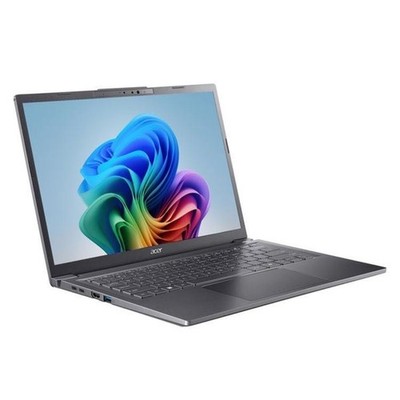
    Acer Aspire 14 AI
    Our pick

    Acer Aspire 14 AI

    Why it fits you

    • The most affordable choice, with a lightweight 14-inch design, strong everyday performance, 16GB memory, and a practical 512GB SSD.
    • It is well suited to office applications, web work, video calls, and multitasking without unnecessary premium features.

    est. €829

    Estimated list price — we haven't checked a shop yet.

    Checking shop prices now…

    Prices change often — check the retailer for the current price.

    Key Specs

    Display
    14-inch WUXGA IPS 60Hz
    Processor
    Intel Core Ultra 5 226V
    Graphics
    Integrated Intel Arc
    RAM
    16GB
    Storage
    512GB SSD
    Battery
    Up to 14 hours

    2 alternatives

    Also a strong fit for what you told us.

    ASUS Zenbook A14 (UX3407)

    ASUS Zenbook A14 (UX3407)

    Why it fits you

    • This is the strongest productivity balance, combining an exceptionally light 0.98kg chassis, a high-quality OLED display, long battery capacity, and capable everyday performance.
    • Windows on ARM may require checking compatibility for specialised legacy work software, but it is otherwise an excellent mobile work laptop.

    Key Specs

    Display
    14-inch WUXGA OLED 60Hz
    Processor
    Qualcomm Snapdragon X
    Graphics
    Integrated Qualcomm Adreno GPU
    RAM
    16GB LPDDR5X
    Storage
    512GB SSD
    Battery
    70Wh

    est. €1,055

    Estimated list price — we haven't checked a shop yet.

    Checking shop prices now…

    Prices change often — check the retailer for the current price.

    Lenovo IdeaPad Pro 5i

    Lenovo IdeaPad Pro 5i

    Why it fits you

    • The best option for demanding productivity workloads, offering 32GB of memory, a spacious 1TB SSD, a sharp 2.8K high-refresh display, and a powerful Intel processor.
    • It is less focused on extreme portability than the ASUS, but provides the greatest performance and capacity headroom.

    Key Specs

    Display
    14-inch 2.8K IPS 120Hz
    Processor
    Intel Core Ultra 7 356H
    Graphics
    Integrated Intel graphics
    RAM
    32GB
    Storage
    1TB SSD
    Battery
    Up to 17 hours

    est. €1,738

    Estimated list price — we haven't checked a shop yet.

    Checking shop prices now…

    Prices change often — check the retailer for the current price.

    Some links are affiliate links. If you buy through them, I earn a small commission at no extra cost to you. Thank you for supporting the site!

    WhatDeviceForMe — AI-powered laptop recommendations

    Frequently asked questions

    How much RAM should a work laptop have in Italy?

    16GB of RAM is a sensible minimum for office work, video calls and multitasking. Choose 32GB if you regularly use large spreadsheets, creative software, virtual machines or many browser tabs.

    Which laptop is best for working while travelling in Italy?

    The ASUS Zenbook A14 is the strongest choice when low weight and battery life matter most. The Acer Aspire 14 AI is also practical for mobile work while offering a more conventional selection of ports.

    Do these laptops have enough storage for work files?

    A 512GB SSD is suitable for documents, apps and cloud-based work, while 1TB provides more room for local projects and media. SSD storage also makes Windows and applications load quickly.

    What ports should I look for in a productivity laptop?

    Useful ports include USB-C for charging and displays, USB-A for older accessories, HDMI for external monitors and a headphone jack. Check the exact configuration before buying, as port selection varies by model and version.

    More picks for Italy

    Browse all laptop picks →