Skip to content

    Best Tablets Over £900 for Work in the UK 2026

    Premium tablets can replace a laptop for many UK professionals, offering sharp displays, desktop-class performance and flexible accessories for typing, presenting and taking notes. This guide compares three leading options over £900.

    We focus on screen quality, keyboard and stylus support, productivity performance and battery life, helping you choose the right tablet for office work, creative tasks, study and mobile working.

    Top 3 picks

    Best Overall
    AI-picked
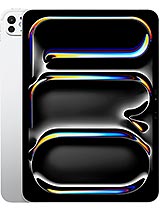
    Apple iPad Pro 11-inch (M4)

    Apple iPad Pro 11-inch (M4)

    Top match score92%

    Why we picked this

    Best Overall: The iPad Pro 11-inch (M4) combines exceptional performance, a high-quality OLED ProMotion display, Thunderbolt connectivity, and a compact design that works well for demanding productivity. iPadOS has a broad professional app ecosystem, and the M4 provides substantial headroom for creative and office workloads. Apple Pencil Pro and Magic Keyboard are additional purchases, unlike the included S Pen on the Samsung.

    Key Specs

    Screen Size
    11-inch Ultra Retina XDR OLED 120Hz
    Processor
    Apple M4
    RAM
    8GB
    Storage
    256GB
    Battery
    Up to 10 hours
    Camera
    12MP main

    Where to buy

    est. £1,199
    Search on Amazon.com

    Prices change often — check the retailer for the current price.
    Best Value
    AI-picked
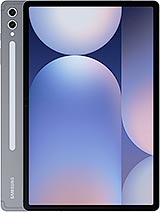
    Samsung Galaxy Tab S10+

    Samsung Galaxy Tab S10+

    Top match score85%

    Why we picked this

    Best Value: The Galaxy Tab S10+ offers the strongest Android productivity package here, with a vivid 12.4-inch 120Hz display, generous memory, included S Pen, and excellent multitasking performance. It is more workspace-friendly than the smaller iPad Pro 11-inch, while costing less than both iPad Pro options. The trade-off is less screen space and lower maximum storage than the Ultra.

    Key Specs

    Screen Size
    12.4-inch Dynamic AMOLED 2X 120Hz
    Processor
    MediaTek Dimensity 9300+
    RAM
    12GB
    Storage
    256GB
    Battery
    10,090mAh
    Camera
    13MP main + 8MP ultrawide

    Where to buy

    est. £989
    Search on Amazon.com

    Prices change often — check the retailer for the current price.
    Premium Pick
    AI-picked
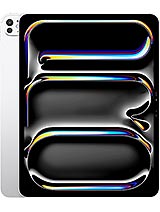
    Apple iPad Pro 13-inch (M4)

    Apple iPad Pro 13-inch (M4)

    Top match score88%

    Why we picked this

    Premium Pick: The iPad Pro 13-inch (M4) provides the largest, brightest high-end workspace, making it especially suited to split-screen documents, spreadsheets, design work, and presentations. It retains the M4 performance, OLED ProMotion display, Thunderbolt connectivity, and professional accessory support of the 11-inch model. It is the largest and least portable option, while the Samsung includes an S Pen and the 11-inch iPad Pro is easier to carry.

    Key Specs

    Screen Size
    13-inch Ultra Retina XDR OLED 120Hz
    Processor
    Apple M4
    RAM
    8GB
    Storage
    256GB
    Battery
    Up to 10 hours
    Camera
    12MP main

    Where to buy

    est. £1,499
    Search on Amazon.com

    Prices change often — check the retailer for the current price.

    Some links are affiliate links. If you buy through them, I earn a small commission at no extra cost to you. Thank you for supporting the site!

    WhatDeviceForMeAI-powered tablet recommendations

    Frequently asked questions

    Are tablets over £900 worth buying for work in the UK?

    They can be worthwhile if you value a lightweight device with a high-quality display, strong performance and optional keyboard or stylus accessories. Check the total cost of accessories before comparing one with a premium laptop.

    Which premium tablet is best for taking handwritten work notes?

    The Samsung Galaxy Tab S10+ and iPad Pro models support dedicated styluses for handwriting, annotation and sketches. Choose based on your preferred operating system, note-taking apps and whether the pen is included or sold separately.

    Can these tablets handle Microsoft 365 and office productivity?

    Yes. All three can run common productivity apps such as Word, Excel, PowerPoint, Teams and email, although app features and multitasking workflows vary between iPadOS and Android.

    What accessories do I need to use a premium tablet as a laptop replacement?

    A keyboard cover is the main upgrade for longer writing and office work, while a stylus helps with notes and document markup. A USB-C hub, external display or mouse may also be useful for a fixed desk setup.

    More picks for United Kingdom

    Browse all tablet picks →