Skip to content

    Best Drawing Tablets Under $700 in the US (2026)

    Finding the best tablet under $700 for drawing means balancing screen quality, pen support, speed, and battery life. The right choice should make sketching comfortable while handling creative apps, reference images, and everyday work.

    Our United States picks include the Lenovo Tab P12, Samsung Galaxy Tab S9 FE, and 11-inch iPad Air with M2. Each offers a different mix of display quality, stylus support, accessories, performance, and value for artists.

    Top 3 picks

    Best Overall
    AI-picked
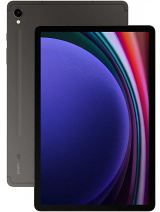
    Samsung Galaxy Tab S9 FE

    Samsung Galaxy Tab S9 FE

    Top match score92%

    Why we picked this

    Best Overall: The Galaxy Tab S9 FE balances portability, durability, and drawing features particularly well, with an included S Pen, smooth 90Hz display, microSD expansion, and IP68 resistance. It is easier to carry than the Lenovo while offering a more complete note-taking setup than the iPad without requiring a separate stylus purchase. Its smaller screen and less powerful chip make it less suitable for large canvases or demanding creative apps.

    Key Specs

    Screen Size
    10.9-inch LCD 90Hz
    Processor
    Exynos 1380
    RAM
    6GB
    Storage
    128GB
    Battery
    8000mAh
    Camera
    8MP rear

    Where to buy

    est. $349
    Search on Amazon.com

    Prices change often — check the retailer for the current price.
    Best Value
    AI-picked
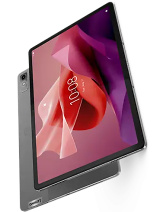
    Lenovo Tab P12

    Lenovo Tab P12

    Top match score85%

    Why we picked this

    Best Value: The Lenovo Tab P12 offers the largest screen here and includes the Lenovo Tab Pen Plus, making it a strong low-cost choice for drawing, handwritten notes, and split-screen work. Its 3K display and expandable storage are useful for creative projects. The tradeoff is that its 60Hz LCD and midrange processor are less refined than the other two tablets.

    Key Specs

    Screen Size
    12.7-inch LCD 60Hz
    Processor
    MediaTek Dimensity 7050
    RAM
    8GB
    Storage
    128GB
    Battery
    10200mAh
    Camera
    13MP rear

    Where to buy

    est. $249
    Search on Amazon.com

    Prices change often — check the retailer for the current price.
    Premium Pick
    AI-picked
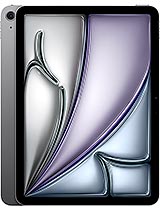
    Apple iPad Air 11-inch (M2)

    Apple iPad Air 11-inch (M2)

    Top match score88%

    Why we picked this

    Premium Pick: The iPad Air 11-inch (M2) provides the strongest performance and a mature drawing-app ecosystem, with a laminated display and support for Apple Pencil Pro. It is the best choice for demanding creative applications and long-term software support. Apple Pencil is sold separately, and the display is limited to 60Hz, unlike the Samsung's 90Hz panel.

    Key Specs

    Screen Size
    10.86-inch Liquid Retina LCD 60Hz
    Processor
    Apple M2
    RAM
    8GB
    Storage
    128GB
    Battery
    Up to 10 hours
    Camera
    12MP rear

    Where to buy

    est. $599
    Search on Amazon.com

    Prices change often — check the retailer for the current price.

    Some links are affiliate links. If you buy through them, I earn a small commission at no extra cost to you. Thank you for supporting the site!

    WhatDeviceForMeAI-powered tablet recommendations

    Frequently asked questions

    Which tablet under $700 is best for drawing in the United States?

    The 11-inch iPad Air with M2 is the strongest overall choice for drawing and creative work because of its fast performance and broad app support. Check the total cost of the compatible Apple Pencil and keyboard before buying.

    Does the Lenovo Tab P12 support a stylus for drawing?

    Yes, the Lenovo Tab P12 supports an active Lenovo stylus, making it suitable for sketching, note-taking, and light creative work. Verify that the pen is included in the bundle you purchase.

    Is the Samsung Galaxy Tab S9 FE good for digital art?

    Yes, the Galaxy Tab S9 FE is a capable option for digital art, especially because compatible S Pen support is typically included. Its display, battery life, and Android creative apps make it a practical choice for artists on a budget.

    What should I look for in a drawing tablet under $700?

    Prioritize a responsive stylus, a sharp and color-accurate screen, enough performance for your preferred creative apps, and strong battery life. Also compare whether the pen, keyboard, charger, and other accessories are included.

    More picks for United States

    Browse all tablet picks →