Skip to content

    Best Laptops under $500 for Students in the United States

    Finding a student laptop under $500 means balancing everyday speed, portability, and features that make long study sessions more comfortable. These picks include a Chromebook and Windows laptops, with processor and graphics performance suited to classwork, browsing, video calls, and streaming.

    Compare memory and storage for your apps and files, then consider real-world battery life, keyboard feel, screen quality, and weight before choosing. Check the available USB and other ports too, especially if you use a monitor, headphones, or external storage for school.

    Guide updated October 13, 2026. Shop prices have their own check dates.

    3 picks

    Best overall
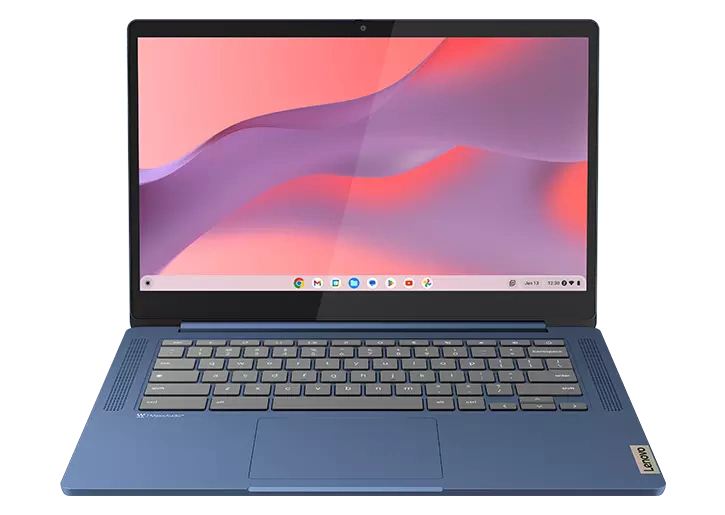
    Lenovo IdeaPad Slim 3 Chromebook
    Our pick

    Lenovo IdeaPad Slim 3 Chromebook

    Why it fits you

    • Best value for reading, research, writing, and web-based coursework.
    • The lightweight ChromeOS setup is straightforward for everyday study, though its 64GB storage and 4GB memory are limiting for large offline files or heavy multitasking.
    • The Windows Lenovo offers more general-purpose flexibility, while the Acer provides more memory and storage for demanding workloads.

    est. $199

    Estimated list price — we haven't checked a shop yet.

    Checking shop prices now…

    Prices change often — check the retailer for the current price.

    Key Specs

    Display
    14-inch 2K touchscreen, LCD, 60Hz
    Processor
    MediaTek Kompanio 540
    Graphics
    Integrated ARM graphics
    RAM
    4GB
    Storage
    64GB eMMC
    Battery
    47Wh, up to 13 hours

    2 alternatives

    Also a strong fit for what you told us.

    Lenovo IdeaPad Slim 3

    Lenovo IdeaPad Slim 3

    Why it fits you

    • A well-rounded study laptop with Windows compatibility for common school applications, a roomy screen for documents, and an SSD for responsive everyday use.
    • Its 8GB of memory and 256GB of storage are adequate for typical coursework but offer less headroom than the Acer. Compared with the Chromebook, it handles a broader range of desktop software; compared with the Acer, it is a less capable multitasking choice.

    Key Specs

    Display
    15.6-inch Full HD IPS, 60Hz
    Processor
    AMD Ryzen 5
    Graphics
    Integrated AMD Radeon graphics
    RAM
    8GB
    Storage
    256GB SSD
    Battery
    47Wh, up to 8 hours

    est. $450

    Estimated list price — we haven't checked a shop yet.

    Checking shop prices now…

    Prices change often — check the retailer for the current price.

    Acer Aspire Go 15

    Acer Aspire Go 15

    Why it fits you

    • The strongest option here for keeping many browser tabs open, working across several applications, and storing larger course projects.
    • Its 16GB of memory and 512GB SSD provide more breathing room than either Lenovo, while its larger chassis is less convenient to carry. Choose the Chromebook for simple, lightweight study or the Lenovo IdeaPad Slim 3 for a more balanced Windows option.

    Key Specs

    Display
    15.6"
    Processor
    120U
    Graphics
    Integrated AMD Radeon graphics
    RAM
    16 GB
    Storage
    512 GB
    Battery
    50Wh, up to 10 hours

    est. $500

    Estimated list price — we haven't checked a shop yet.

    Checking shop prices now…

    Prices change often — check the retailer for the current price.

    Some links are affiliate links. If you buy through them, I earn a small commission at no extra cost to you. Thank you for supporting the site!

    WhatDeviceForMe — AI-powered laptop recommendations

    Frequently asked questions

    Is a Chromebook or Windows laptop better for college students under $500?

    A Chromebook can suit students who mainly use browser-based apps, Google Workspace, and online learning tools. Choose a Windows laptop if your classes require desktop software or broader compatibility with programs and peripherals.

    How much RAM does a student laptop under $500 need?

    For smooth everyday multitasking, 8GB of RAM is a practical target. Check the exact configuration before buying, since memory may be limited or not upgradeable.

    How long should a budget student laptop battery last during classes?

    Battery life varies with screen brightness, workload, and age, so advertised figures may exceed what you get in class. Look for independent real-world testing and consider carrying a charger for long campus days.

    What ports should students look for in a laptop under $500?

    Useful ports include USB-A for common accessories, USB-C for newer devices, and HDMI for connecting to classroom displays or monitors. A headphone jack and a card reader can also help, depending on your equipment.

    More picks for United States

    Browse all laptop picks →